
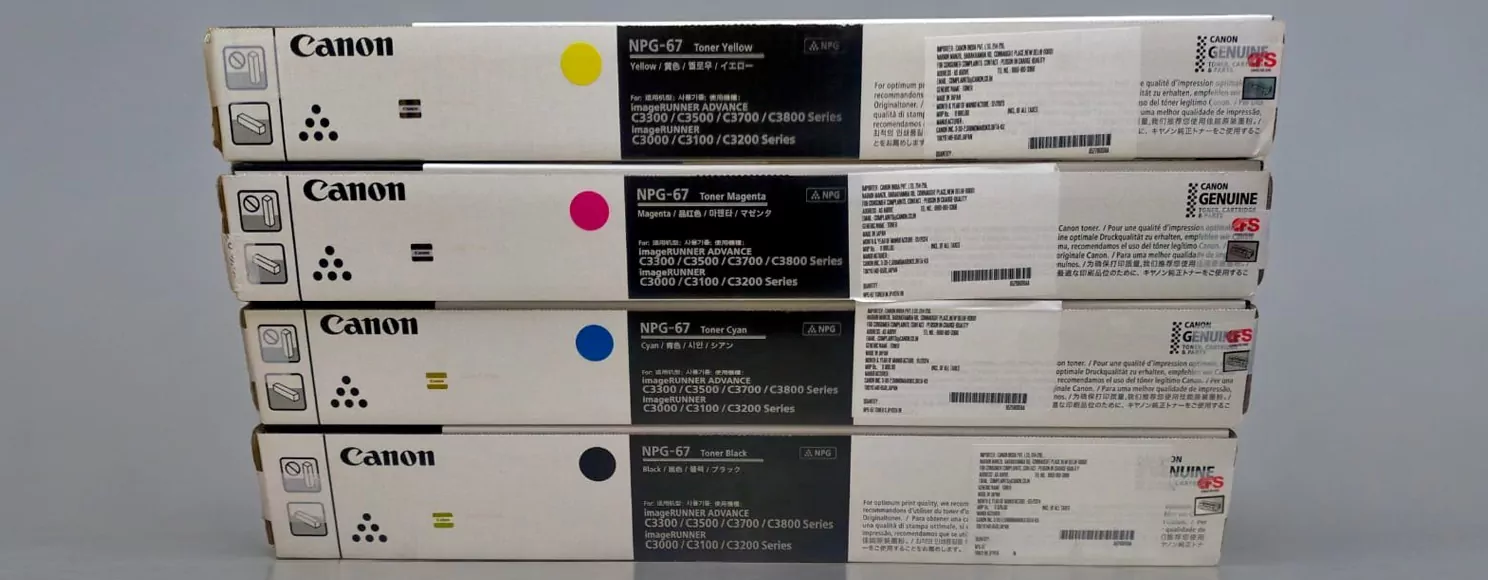
How to Choose Canon Copier Toner and Cut Office Printing Costs
Your copier is only as good as the toner inside it. Pick the wrong cartridge and you are looking at faded output, frustrated staff, and money spent twice. This guide covers everything you need to know about Canon copier toner, from picking the right type to getting it shipped fast anywhere in Australia.
What Is Canon Copier Toner
Canon copier toner is a fine electrostatically charged powder used in laser copiers and multifunction devices to reproduce text and images on paper. This is where it diverges sharply from inkjet technology. Rather than soaking into the page, toner powder is fused onto the surface by a heated roller called the fuser unit, which is why laser output feels dry to the touch the moment it exits the machine.
Canon toner cartridges contain a blend of pigment, polymer resin, and proprietary additives formulated to work within specific machine tolerances. That blend affects print density, edge sharpness, and how cleanly the cartridge evacuates near the end of its cycle. Running toner matched to your model protects the drum unit, developer roller, and fuser from premature wear.
For offices running medium to high print volumes, toner quality has a direct line to running costs. A cartridge that falls short of its advertised page yield, or one that throws error codes on first insertion, costs far more over a quarter than its purchase price ever suggested. Getting this decision right early is the kind of thing that quietly saves a business several hundred dollars a year.
Types of Canon Copier Toner
Not all Canon toner cartridges work the same way, and the differences matter more than most people realise when they are just trying to keep the office running.
1. Standard-Yield Toner
Standard-yield cartridges are built for offices with moderate throughput, typically rated between 1,500 and 3,000 pages per unit. Lower upfront cost makes them practical for low-traffic machines, backup units, or branch offices where the copier sits idle most of the week. Worth noting, though: the cost per page is noticeably higher than high-yield alternatives, so they are rarely the smart call for a machine that runs all day.
2. High-Yield Toner
High-yield Canon toner cartridges carry a larger toner reservoir, with yields commonly ranging from 6,000 to over 20,000 pages depending on the series. For an office printing hundreds of pages daily, that translates to fewer change-outs, less downtime spent swapping cartridges, and a meaningfully lower cost per page. I’ve noticed that offices making the switch from standard to high-yield often underestimate the cumulative saving until they run the numbers across a full year.
3. Compatible vs. Genuine Toner
Genuine Canon toner is manufactured by Canon itself and engineered to meet the specific tolerances of each machine model. It delivers the most consistent output and comes with clear warranty backing.
Compatible Canon toner comes from third-party manufacturers who reverse-engineer the formulation, chip coding, and physical dimensions to produce a functional alternative. Quality varies considerably across brands. Reputable compatible suppliers subject their cartridges to rigorous testing, and many perform on par with genuine options at significantly lower prices.
The right call between the two depends on print volume, your service agreement terms, and your tolerance for variability. There is more detail on this trade-off in the comparison section below.
Benefits of Quality Canon Toner
Using quality Canon toner cartridges, whether genuine or from a well-regarded compatible supplier, delivers tangible benefits that go well beyond putting ink on a page.
Consistency is the first one. Client proposals, regulatory documents, and account invoices need to look professional every time, not just on the first hundred pages of a new cartridge. Quality toner holds its density right through the cycle, avoiding the frustrating fade that cheaper formulations tend to show as they near depletion.
Machine longevity is another factor that does not get enough attention. Poor-quality toner leaves residue on the drum and fuser components, accelerating wear and eventually forcing costly repairs or early replacement. Reliable toner keeps internal components cleaner over thousands of print cycles.
Accurate yield reporting is also worth highlighting. Quality cartridges communicate correctly with the printer’s toner level sensor, so your low-toner alert fires at the right time. Run a cheap cartridge through the same machine and that indicator can become unreliable, leaving you with a blank page mid-presentation.
Finally, full cartridge evacuation matters for value. Low-grade toner often leaves a substantial powder residue behind when the cartridge signals empty. Better formulations empty more completely, meaning you get closer to the full rated yield with every purchase.
How to Choose Compatible Canon Toner
Choosing the right compatible Canon toner is straightforward once you know what to check. Skip these steps and you risk ordering a cartridge that either will not fit or will underperform from day one.
1. Check Model Compatibility
Start with the model number on your copier’s identification label, usually found on the front panel or inside the paper tray bay. Canon toner cartridges are machine-specific; a cartridge built for the imageRUNNER 2630 will not seat correctly in a 2525, even though the two machines share a visual resemblance. Cross-reference the part number in your machine’s user manual, or use the supplier’s compatibility lookup tool before adding anything to your cart.
2. Compare Yields and Page Counts
Canon toner yields are quoted at 5% page coverage, the ISO industry benchmark. That assumes a fairly standard mix of body text and sparse graphics. If your office regularly prints financial reports with dense tables, engineering drawings, or anything with large filled areas, real-world yield will be noticeably lower than the spec sheet figure. Compare cartridges on cost per page rather than sticker price. A $40 cartridge yielding 3,000 pages costs roughly 1.3 cents per page; an $80 high-yield option delivering 10,000 pages drops that to 0.8 cents. Over a year of heavy use, that gap is significant.
3. Verify Australian Supplier Reliability
A local supplier shortens shipping lead times and simplifies returns if a cartridge arrives damaged or throws errors. Look for businesses that publish clear return policies, state a warranty period on compatible stock, and carry reviews that specifically mention delivery consistency. What’s striking here is how often buyers overlook the supplier’s product range as a quality signal; a company that stocks Canon photocopier toner alongside maintenance kits, drum units, and spare fusers has almost certainly invested more in vetting its supply chain than one flogging cheap Canon toner cartridges as a side line.
Canon Toner vs. Generic Options
The genuine vs. compatible Canon toner question is one of the most common debates in office purchasing, and the honest answer is more nuanced than either side usually admits.
Genuine Canon toner is produced to exact tolerances, tested against the machines it serves, and backed by Canon’s warranty terms. If your equipment runs under a managed print service or manufacturer service agreement, check the fine print on consumables before switching; some contracts specify genuine-only supply.
Quality compatible Canon toner can come very close to genuine performance. The better third-party manufacturers invest seriously in formulation chemistry, chip emulation, and dimensional accuracy. Many of their products meet ISO/IEC 19752 and ISO/IEC 24711 print quality benchmarks and deliver page yields that match or exceed Canon’s own spec. The price gap is real: compatible cartridges typically land 30% to 60% below the genuine equivalent, and across a fleet of six or eight machines, that adds up to a meaningful annual saving.
Here is the contrarian take most purchasing guides skip: the risk of compatible toner is almost entirely a sourcing problem, not a technology problem. The formulation chemistry for quality laser toner is well understood. What varies is whether the manufacturer bothered to apply it properly. Cheap Canon toner cartridges sourced from grey-market suppliers or unverified online marketplaces are a gamble. The same compatible cartridge from a specialist supplier with an ISO-certified manufacturing partner is a different product category entirely, even if the packaging looks similar.
For the majority of Australian offices printing standard business documents, a compatible cartridge from a reputable local supplier competes with genuine on quality and wins clearly on price.
Top Canon Toner Models for Offices
Several Canon toner cartridge series turn up consistently across Australian workplaces, and it is worth knowing the key differences before you order.
The Canon 069 series is designed for the imageCLASS MF750 and LBP670 ranges, with high-yield variants reaching up to 7,600 pages. It handles medium-volume colour output well and is widely stocked in compatible format by Australian suppliers.
Canon’s 056 and 057 series serve the imageRUNNER and imageRUNNER ADVANCE monochrome lineup. High-yield versions clear 10,000 pages per cartridge, making them a practical fit for busy reception desks and accounts departments with heavy document throughput.
The GPR series covers older imageRUNNER machines still running in plenty of established offices (and there are more of those still in service than you might expect). GPR-53 and GPR-55 cartridges are readily available in both genuine and compatible formats through most Australian distributors.
For colour multifunction output, the Canon 040 and 041 series cover imageRUNNER ADVANCE C3500 and related models, with separate high-yield options across all four colour channels. Always confirm your exact model number before ordering; the channel designations look similar but are not interchangeable.
How to Install Canon Copier Toner
Installing Canon copier toner takes under five minutes. Done correctly, it saves you from the two most common post-installation headaches: smeared output and chip recognition errors.
1. Prepare Tools and Workspace
No specialist tools are required. Clear a flat surface close to the machine and keep a dry, lint-free cloth within reach for any minor powder spills. Avoid installing cartridges near open air vents; toner is a fine particulate and disperses easily. Wash your hands before and after handling the cartridge, both to avoid contaminating the drum surface and to keep toner off your clothing.
2. Remove and Replace Cartridge
Open the front access panel (most Canon models will display an on-screen prompt guiding you through the sequence). Grip the old cartridge by its handle and pull it directly outward; tilting it risks spilling residual toner inside the machine. Take the new cartridge out of its packaging, then rock it gently from side to side four or five times to distribute the powder evenly before inserting it. Slide it into the slot along the guide rails until it seats with a firm click.
3. Run Maintenance Cycle
Close the panel, power the machine on, and let it run its automatic drum calibration or toner registration sequence without interrupting it. This step is where impatient users often create problems for themselves; sending a print job before calibration completes can produce uneven density on the first few pages. Print a test page once the cycle finishes. If output looks faint or patchy on the first couple of sheets, run three to four additional pages to allow the toner to settle fully against the drum surface.
Cost-Saving Tips for Canon Toner
Toner spend is one of the more controllable line items in an office budget. A few deliberate changes in purchasing and print habits can reduce it noticeably without touching output quality.
1. Bulk Buying Strategies
Multipacks and larger order quantities reduce the per-unit cost and often unlock free shipping thresholds with Australian suppliers. For offices with predictable monthly print volumes, forward-ordering a quarter’s supply at once eliminates last-minute express freight costs, which can easily cancel out the savings from a discounted cartridge if you are paying $20 to $30 per urgent delivery.
2. High-Yield Selection
Switching to high yield Canon toner is the single most effective per-page cost reduction available without changing hardware. The higher purchase price is consistently offset by lower cost per page; for any machine printing more than 500 pages per month, the arithmetic firmly favours high-yield. Run the numbers once on your own fleet and the case becomes obvious.
3. Recycling Programs
Canon and several Australian resellers run cartridge return schemes where empty units earn credits against future orders. Beyond the financial benefit, it keeps waste out of landfill, which is increasingly relevant for businesses with sustainability reporting obligations. Ask your supplier about return options before your next disposal run.
Common Canon Toner Issues and Fixes
Quality toner reduces the frequency of problems, but it does not eliminate them entirely. Most issues have a clear cause and a straightforward fix.
1. Streaks and Smudges
Vertical streaks running down the page usually indicate toner buildup or a surface scratch on the drum unit. Remove the cartridge, inspect the drum surface carefully under good light, and wipe gently with a dry, lint-free cloth if you spot residue. Horizontal smudging across the page more often points to a fuser temperature issue or a damaged cartridge seal. If a fresh cartridge does not resolve persistent streaking, the drum unit itself may have reached the end of its service life.
2. Low Yield Problems
A cartridge exhausting well before its rated page count is almost always a coverage issue rather than a product defect. The 5% coverage benchmark used to calculate yield represents a fairly sparse page; a legal document with dense paragraph text and narrow margins can easily run at 12% to 15% coverage, cutting your effective yield by more than half. Switching internal documents to economy mode and reserving standard quality for client-facing output is a practical fix that costs nothing.
3. Compatibility Errors
Error codes on first installation of a compatible cartridge are nearly always chip-related. Canon periodically updates firmware on its machines, and if the chip in a compatible cartridge has not been updated to match, the printer refuses to recognise it. A reputable supplier will either stock current-chip stock or replace the cartridge promptly. Before ordering compatible Canon toner replacement for a recently updated machine, confirm with the supplier that their stock is firmware-compatible with your current version.
Fast Shipping Options for Toner in Australia
Running out of toner mid-week is avoidable, and yet it happens in offices that simply do not plan their reorder timing. Canon toner fast shipping through domestic Australian suppliers means the gap between ordering and printing is usually short.
Standard delivery to metro areas in Sydney, Melbourne, Brisbane, and Perth typically runs one to two business days from suppliers holding stock locally. Express options bring that down to next business day for most capital city postcodes. Regional and remote locations should factor in three to five business days on standard services, which makes maintaining a minimum stock level especially important outside metro areas.
The cleanest approach is to set a reorder trigger point for each active toner model, typically when you reach your last spare cartridge, and place the order the same day. That habit alone removes almost every scenario where you need to pay for express freight.
Maintenance Tips to Extend Toner Life
Getting the full rated yield from your Canon toner cartridges is partly about the cartridge itself and partly about how well you maintain the machine around it.
Store spare stock in sealed packaging, away from direct sunlight and heat. Toner polymer degrades with UV exposure and elevated temperature; a supply cabinet near a window or above a server rack is not the right location. Most cartridges carry a shelf life of two to three years when stored correctly, so bulk purchasing is safe provided conditions are controlled.
Set the printer’s default output mode to economy or draft for all internal documents. Reserve standard or high-quality mode for anything leaving the building. That one default setting change reduces toner consumption by 20% to 30% on high-volume machines, with no perceptible drop in quality for everyday internal use.
Clean the paper path and intake rollers on a regular schedule. Dust and paper debris inside the machine cause toner to transfer inconsistently, wasting powder and producing output that looks uneven even with a full cartridge installed. Running the machine’s built-in cleaning cycle every few weeks, particularly if you print heavy-coverage documents regularly, keeps the drum and fuser clear before residue accumulates to the point where it affects quality.
Frequently Asked Questions
What is the difference between genuine and compatible Canon toner?
Genuine Canon toner is produced by Canon to the exact specifications of each machine model, with consistent formulation and full warranty backing. Compatible Canon toner is made by third-party manufacturers to functionally match those specs. Genuine stock offers the most predictable performance; quality compatibles from reputable suppliers can match it closely at a lower price point, making them a practical option for cost-conscious operations.
How do I know which toner fits my Canon copier model?
Locate the model number on your copier’s identification label, usually on the front panel or inside the paper tray bay. Cross-reference that number with the supplier’s compatibility chart or your machine’s user manual, which will specify the exact cartridge part number. If you are still uncertain, call the supplier with your model number before ordering rather than after.
Are compatible toners reliable for high-volume printing?
Yes, when sourced from established suppliers using ISO-certified manufacturing. Quality compatible cartridges are tested to the same print quality benchmarks as genuine stock and handle sustained high-volume runs without performance degradation. The variable is supplier quality, not the technology.
Where can I find affordable Canon toner with fast Australia shipping?
Specialist office consumables suppliers with domestic warehousing are your best option. Look for those advertising one to two business day metro delivery, clear return policies, and specific Canon copier toner Australia compatibility listings. Generalist online marketplaces can work, but verifying shipping origin and return terms is harder.
How much toner does a high-yield cartridge produce?
It varies by model and series. High-yield Canon toner cartridges are generally rated between 6,000 and 20,000 pages at 5% page coverage. Always check the yield specification listed for the specific part number you are purchasing rather than relying on general category figures.
Can using generic toner void my copier warranty?
Under Australian Consumer Law and the Competition and Consumer Act, a manufacturer cannot void your warranty simply because you used a compatible consumable; they would need to demonstrate that the compatible product directly caused the fault. That said, if a low-quality cartridge does cause damage, proving the link becomes complicated. Using quality compatible toner from a supplier with a stated product warranty keeps you on solid ground.
What causes toner to run out quickly?
High page coverage is the primary driver. Documents with dense body text, filled graphic elements, or full-bleed headers consume significantly more toner per page than the 5% coverage standard used in yield calculations. Printing in standard or high-quality mode for all output, including internal drafts, compounds the issue. Switching internal documents to economy mode is the most immediate fix.
How do I store Canon toner cartridges properly?
Keep cartridges in their original sealed packaging, stored horizontally in a cool, dry space away from direct light and heat sources. Avoid locations near strong magnetic fields or high humidity. Once a cartridge is opened and installed, use it promptly. Under correct storage conditions, most Canon toner cartridges remain within specification for two to three years from the manufacture date.