
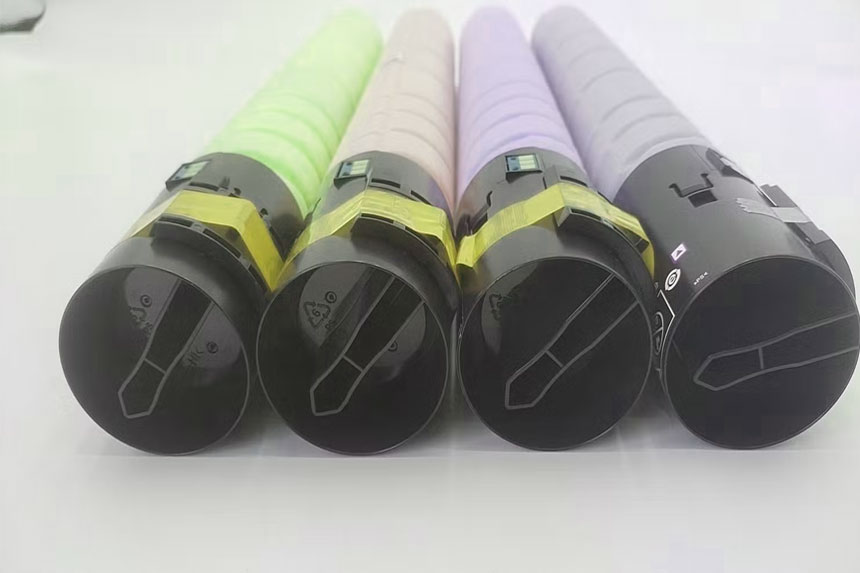
Konica Minolta Copier Toner: Complete Guide to Models, Costs & Sustainability
Konica Minolta Copier toner is a critical consumable for businesses using bizhub printers and multifunction devices. These toner cartridges come in three main types: genuine OEM, compatible, and remanufactured options. Each offers different cost structures, page yields, and reliability levels. Understanding these differences helps you reduce printing expenses while maintaining quality. This guide covers everything from polymerized toner technology to recycling programs.
How to Choose the Right Toner for Your Konica Minolta Copier
Choosing the right toner starts with knowing your printer model and understanding your printing volume. The TN-324 series works with bizhub C258, C308, and C368 models, while TN-626 cartridges fit the C450i, C550i, and C650i machines. Each bizhub toner series is designed for specific printer models. These laser printer consumables are essential components that directly affect your print quality and operational costs.
You need to match the cartridge number to your printer. Check your printer manual or the old cartridge for the correct model number. Black cartridges like the TN-324K yield about 28,000 pages, while color cartridges produce around 26,000 pages at 5% coverage. Your monthly print volume determines whether standard or high-yield cartridges make financial sense. High-volume users benefit from bulk purchasing or subscription services that reduce the cost per page significantly.
Consider your quality requirements too. Client-facing documents need premium output, while internal memos can use more economical options. The cartridge chip inside newer models tracks usage and ensures compatibility with your printer’s firmware. The term “toner” originated in 1888 as an agent noun from “tone,” initially used in photography from 1920 and adapted for xerography from 1954, marking its evolution as a fundamental imaging supply.
OEM vs Compatible vs Remanufactured Toner Options
You face three main choices when buying Konica Minolta toner. OEM cartridges cost between $50 to $150 but offer the highest reliability, with 62% fewer performance issues than alternatives. These genuine cartridges come directly from Konica Minolta and guarantee perfect compatibility. The original equipment manufacturer products represent the premium tier of copier supplies.
Compatible toner cartridges are manufactured by third parties to work with Konica Minolta printers. These options typically cost $20 to $60 on average, offering savings of 30-50% compared to OEM cartridges. Quality varies by manufacturer, so buy from reputable suppliers. Premium compatible options now achieve near-OEM performance in testing. These third-party alternatives serve as the antonym to proprietary OEM products in the marketplace.
Remanufactured cartridges are recycled OEM units that have been cleaned and refilled. They offer potential savings up to 70% over OEM options but carry higher risks of inconsistent quality, streaking, or leaks. The page yield may be lower than advertised. Many businesses use a mixed strategy: OEM toner for important documents and compatible options for everyday printing. Understanding this hierarchy—from premium OEM to budget remanufactured—helps you make strategic purchasing decisions.
For expert guidance on choosing the right toner for your specific needs, visit www.copiershub.com.au where you’ll find detailed compatibility charts and professional advice.
Page Yield and Cost-Per-Page Comparisons
Understanding your true printing costs requires calculating the cost per page. A $55 OEM black toner printing 2,500 pages costs about 2.2 cents per page, while a $25 compatible version printing 2,000 pages drops to 1.25 cents per page. This formula divides cartridge price by page yield. The toner powder composition directly affects these metrics.
Konica Minolta printers have some of the cheapest toner on the market, with several bizhub printers operating at a fraction of a cent per page. High-yield cartridges cost more upfront but reduce long-term expenses. Track your actual usage against rated yields, as real-world results vary based on page coverage, document types, and print settings. Components like the drum unit (lasting 75,000-120,000 pages) and waste toner box (100,000 pages) are separate consumables with different replacement cycles, representing the meronyms—individual parts that constitute the complete printing system.
Risks and Warranty Considerations
Using non-OEM cartridges carries certain risks you should understand. Damage to printer parts can occur if the toner composition is incorrect, including harm to the fuser unit. Some manufacturers claim that third-party cartridges void warranties, though this varies by region and local consumer protection laws.
Bulk toner purchases from unknown suppliers may contain substandard powder that damages your printer’s internal components. Stick with reputable compatible brands that offer warranties. Poor quality toner can cause streaking, fading, and premature failure of the photosensitive drum. The money you save on cheap cartridges can disappear quickly if you need expensive printer maintenance or repairs. The developer unit—another critical meronym of the printing assembly—also suffers from incompatible toner formulations.
Advanced Toner Technology: Polymerized (Simitri) Toner
Konica Minolta developed Simitri V Toner using chemical polymerization, which reduced the fixing temperature by about 15°C and enables customers to reduce annual CO2 emissions from printing by about 20 to 25%. This polymerized toner represents a major advancement in printing technology. Toner cartridges contain toner powder, a fine, dry mixture of plastic particles, carbon, and black or other coloring agents that create the actual image on paper.
The polymerized Simitri HD toner fuses at much lower temperatures, significantly reducing energy consumption during the printing process. The particles are spherical and uniform in size, unlike traditional pulverized toner. This shape allows precise image reproduction with sharper text and smoother gradients. The energy-efficient toner also speeds up printing since less heat is required. This represents a hypernym of all eco-conscious printing technologies.
Konica Minolta’s Core Shell Configuration features toner particles that are soft inside and hard outside, allowing toner to melt at lower temperatures while preventing particles from clumping together during storage. This design maintains consistent quality over time. The manufacturing process itself is cleaner. The polymerized toner production emits 40% less CO2, NOx, and SOx than conventional pulverized toners.
Simitri HD toner contains plant-based biomass materials, making it more sustainable. The polymerized toner contains almost 10% biomass, significantly reducing emissions during disposal and resulting in a reduction in toner consumption by more than 30%. This technology gives you better quality prints while cutting both costs and environmental impact. The collocations frequently associated with Konica Minolta toner—”superior imaging,” “exceptional print quality,” and “reliable performance”—reflect the brand’s market positioning.
Managing Toner Supply & Inventory for Businesses
Smart inventory management prevents costly downtime when you run out of toner unexpectedly. Calculate your monthly usage by tracking page counts over three months. Keep at least one spare cartridge for each color, or two if you’re in a high-volume environment. Understanding the holonym—your complete copier system—helps you anticipate when all consumables need replacement.
Some suppliers offer subscription services that automatically ship replacements based on your usage patterns. These programs often include discounts and eliminate the risk of running out. Work with multiple vendors to avoid supply chain disruptions. Recent shortages have affected certain Konica Minolta models, making backup suppliers essential.
Store toner properly in a cool, dry place away from direct sunlight. Properly stored cartridges can last up to two years. Unlike ink cartridges that can dry out, toner powder remains stable for years. Keep cartridges in their original packaging until needed. Track expiration dates if your manufacturer includes them, though most toner has a shelf life of several years.
Consider volume discounts when purchasing multiple cartridges at once. Many suppliers offer bulk pricing that reduces your per-unit cost. Balance this against storage space and cash flow needs. For large offices, establishing par levels for each cartridge type ensures you never run critically low. The connotation of having adequate copier supplies inventory is professional preparedness and operational reliability.
Troubleshooting Common Toner Issues
“Low toner” warnings often appear before cartridges are actually empty. Many Konica Minolta copiers display this message when 10-20% of toner remains. You can continue printing, though quality may decline. Reset procedures exist for some models, but use them carefully as they override safety features.
Faded prints usually indicate low toner or distribution problems. Shake a new toner cartridge well, approximately 5 to 10 times, before installing it. If prints remain faded, the developer unit may need replacement. Streaks or lines suggest a dirty drum or damaged cartridge. Clean the drum carefully with a soft, lint-free cloth.
Smudges or toner spots indicate a problem with the fuser assembly. The fuser needs maintenance or replacement if it’s not properly melting the toner onto paper. Ghosting, where faint duplicates of images appear, typically points to drum or transfer roller issues. These symptoms indicate problems with specific semantically related entities within the electrophotographic printing process.
Regular printer maintenance prevents many toner-related problems. Clean the printer interior monthly to remove dust and excess toner. Replace consumables on schedule rather than waiting for complete failure. Keep firmware updated as manufacturers release patches that improve toner management and compatibility. Take utmost care to avoid inhaling toner dust or getting skin contact, and wash thoroughly with soap and water if toner lands on your skin or clothing.
For professional troubleshooting support and genuine Konica Minolta toner cartridges, visit www.copiershub.com.au for comprehensive solutions.
Sustainability: Recycling and Environmental Impact
Konica Minolta offers the Clean Planet Program, a recycling program for used toner cartridges in over 20 countries, including Europe, the U.S., and Japan. This free service makes toner recycling simple and convenient for businesses of all sizes. The program exemplifies the rare attribute of manufacturer-led circular economy initiatives.
The Clean Planet Program recovers the maximum possible volume of secondary raw materials (87.3%) from Konica Minolta toners and other consumables, with the remaining 12.7% used in energy recovery processes. Nothing goes to landfills. All cartridges are recycled with zero waste to landfill and zero incineration, with recovered materials re-engineered into useful products such as asphalt and plastic modifiers. This represents a common attribute of modern enterprise recycling programs.
The program works through simple steps. Order collection boxes through the online portal. Fill boxes with used cartridges from any brand. Schedule free UPS pickup when boxes are full. For customers using less than 3 consumables per month, consolidate at least 5 items in any box, print a shipping label from the website, and ship. Larger operations receive dedicated collection boxes and scheduled pickups.
Konica Minolta has started producing toner bottles made from recycled HDPE plastics from recycled milk bottles. Their monochrome printers use HDPE bottles that you can recycle locally rather than shipping back. This reduces transportation emissions while supporting local recycling infrastructure. The polysemy of “toner”—referring both to the powder substance and the complete cartridge assembly—often creates confusion in recycling communications.
Choosing eco-friendly toner reduces your environmental footprint. The polymerized manufacturing process uses less energy. Lower fusing temperatures save electricity during every print job. Recycling programs close the loop by turning old cartridges into new products. These practices help businesses meet sustainability goals while maintaining print quality. The word “cartridge” originated in 1570s from French cartouche, meaning “a full charge for a pistol,” originally wrapped in paper, with the notion of a roll of paper containing a charge—an etymology that highlights how container technology evolved from military to office applications.
Key Points for Readers:
- Match cartridge models precisely – Using TN-324 cartridges in non-compatible printers causes immediate failure and potential damage
- Calculate true costs with page yield – A cheaper cartridge with lower yield often costs more per page than a premium option
- Polymerized toner saves money and energy – Simitri technology reduces power consumption by up to 25% while improving quality
- Maintain spare inventory – Supply chain disruptions can leave you without toner for weeks, so keep backup cartridges
- Use recycling programs – Free return shipping through Clean Planet makes proper disposal easy and supports sustainability goals
For more information about Konica Minolta toner cartridges and expert advice on choosing the right supplies for your business, visit www.copiershub.com.au today.