
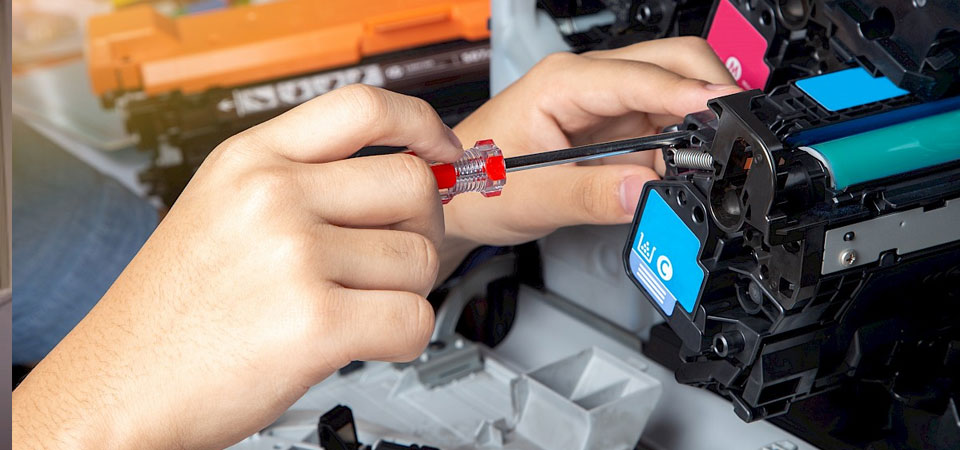
Konica Minolta Copier Parts: Smart Selection and Maintenance Guide
Konica Minolta Copier Parts are the replacement modules that keep your Bizhub multifunction devices running smoothly. These include drum units, fuser assemblies, transfer belts, developer units, and feed rollers. Understanding which parts fit your specific model and when to replace them saves you money and prevents costly downtime. Your choice between OEM and compatible parts directly affects print quality, machine lifespan, and total cost of ownership.
Common Konica Minolta Copier Parts and Functions
Your copier needs several key components working together. Each part handles a specific job in the printing process.
The main parts include drum units that create the image, fuser assemblies that bond toner to paper, transfer belts that move images from drum to paper, developer units that prepare toner, and various roller assemblies that feed paper through the machine. These imaging components (a hypernym for the various parts that create and transfer the printed image) work as a complete system within your multifunction device. Drum units typically last 100,000 to 200,000 pages depending on your model. Transfer belts wear out over time and may show stripes or spots in printed output when they fail. Fuser units handle the heat process and usually need replacement after extended use at high volumes. Developer units work with the drum to apply toner correctly. Feed rollers work with separation pads to feed paper from the input tray into the printer accurately and consistently, moving paper from trays through the device and wearing down with constant friction.
Drum and Developer Units
These parts create and prepare the image before printing. The drum holds an electrostatic charge that attracts toner particles.
The drum unit is a green photosensitive cylinder that forms images through electrostatic charges. Different Bizhub models use specific drum types. For example, DR-512 drums work with C224, C284, C364, and C454 models. You need to cross-reference the 7-10 character alphanumeric part number in your device’s service manual or Konica Minolta’s compatibility portal. Using the wrong drum can trigger machine errors or void your warranty. Developer units work alongside drums to condition toner powder before application. These units require periodic replacement based on your print volume and page counter readings. Understanding these Bizhub parts (a collocation, as Bizhub and parts frequently appear together when discussing Konica Minolta equipment) ensures you order correctly for your specific model series.
Fuser, Transfer Belt and Feed Rollers
These components complete the printing process by transferring and fixing images to paper.
The fuser assembly uses heat and pressure to permanently bond toner to paper. When fusers fail, you’ll see toner smearing or incomplete fixing. Transfer belts measure their lifespan by page count and rotation time rather than calendar time. Most machines alert you when the belt reaches its service threshold. Feed rollers provide a secure grip on the paper, preventing misfeeds and paper jams, while making the paper flatter, smoother, softer, and tougher through rotation and pressure. Separation rollers, also known as retard rollers or break rollers, separate pages when multiple sheets are fed into a copier. Regular cleaning extends roller life, but eventually friction wears down the rubber surface requiring replacement. These consumable parts (meronyms, being specific components within the larger category of copier parts) demand attention at different intervals based on your usage patterns.
How to Pick the Right Part for Your Bizhub Model
Finding the correct part requires knowing your exact model number and part specifications. Wrong parts waste money and can damage your machine.
Start by checking your device’s model number, usually found on a label inside the front cover or on the side panel. Common Bizhub series include C224, C284, C364, C454, C554, C650i, and newer i-series models like C250i, C300i, and C360i. Each series uses specific part numbers. Look up your required part in the service manual or on genuine parts supplier websites (a collocation emphasizing authenticity and original manufacturer status). Mismatched components may cause machine errors or void warranties. Note that firmware versions sometimes affect compatibility. Newer i-series models use enhanced security features that require more sophisticated compatible parts than older Bizhub models. Whether you need office equipment components (a hypernym representing the broader category that includes copier parts) or specific replacement modules, exact model matching prevents costly errors. For reliable sourcing of Konica Minolta parts with detailed compatibility information, visit https://copiershub.com.au/ where you can find comprehensive part listings matched to specific Bizhub models.
OEM Parts vs Compatible Aftermarket Options
You’ll choose between OEM parts made by Konica Minolta and compatible parts from third-party manufacturers. Each option offers different trade-offs.
Original Equipment Manufacturer components (the etymology of OEM, referring to parts made by the same company that manufactured your device) guarantee exact fit and performance but cost significantly more. They maintain your warranty coverage and meet original specifications. High-quality compatible parts from ISO-certified suppliers demonstrate 90-97% reliability in third-party testing. Compatible parts typically cost 40-60% less than OEM while delivering similar performance. Critical components like fusers and transfer belts show higher variance in quality among compatible options. You should prioritize suppliers with ISO 9001, ISO 14001, and ISO/IEC 27001 certifications. Always verify test reports for duty cycle validation before purchasing compatible parts. Some compatible parts use remanufactured components, which are professionally rebuilt OEM cores that meet original performance specifications through complete disassembly and recalibration. Unlike disposable cartridges (an antonym representing single-use items versus repairable/replaceable parts), quality copier parts offer extended service life when properly maintained. Trusted suppliers like https://copiershub.com.au/ provide both OEM and quality-tested compatible options, helping you make informed choices based on your budget and performance requirements.
Part Lifespan and Replacement Intervals
Timing your replacements prevents unexpected failures and maintains print quality. Most parts signal when they need attention.
Your machine’s control panel displays alerts when parts approach their rated lifespan. Maintenance kits include bundled components like fuser units, transfer rollers, pickup assemblies, and separation pads designed for specific yield intervals such as 200,000 pages. Drum units typically last 100,000 to 200,000 pages based on your model and print volume. Transfer belts generally reach end-of-life around 150,000 to 200,000 pages. Fuser units vary widely but often last 200,000 to 400,000 pages. When the print counter or transfer belt rotation time counter reaches the service life threshold, the printer will show that it needs to replace the transfer belt unit. Feed rollers can become worn or damaged, which can lead to paper jams and other printing issues, and should be replaced when they show signs of wear. Don’t wait until parts completely fail. Replace components when you see quality degradation like streaks, ghosting, or feeding problems. This prevents damage to other parts and reduces downtime. Understanding these service intervals (a semantically related entity referring to the scheduled timing between maintenance actions) helps you plan replacement budgets and minimize disruption.
Supply Chain Issues and Warranty Considerations
Global supply challenges in 2025 affect part availability and delivery times. Smart planning prevents printing interruptions.
Supply chain disruptions continue affecting genuine Konica Minolta availability throughout 2025, with 64% of e-commerce businesses reporting supply chain issues. Order replacement parts when current ones reach 25% capacity rather than waiting for low warnings. Asia-based suppliers typically deliver in 7-15 days via express shipping. Maintain a two-month spare inventory for critical parts, especially drums and fusers. Consider multiple supplier relationships to protect against single-source shortages. Using non-OEM parts doesn’t automatically void your warranty, but using incompatible or poor-quality parts can void coverage if they cause damage. Konica Minolta warns that counterfeit consumables circulate worldwide, and if the price seems too good to be true, you’re probably not buying genuine products. Verify authenticity through authorized dealers and check for proper packaging, serial numbers, and quality labels. The procurement process (a semantically related entity describing the purchasing and supply chain management of parts) requires extra diligence in today’s market conditions. Working with established Australian suppliers like copiershub.com.au ensures reliable stock availability and authentic parts with proper warranty support.
Troubleshooting Common Part Failures
Recognizing failure symptoms helps you identify which part needs replacement. Quick diagnosis reduces machine downtime.
Streaks or lines in prints usually indicate worn drum units or dirty transfer belts. Ghosting (faint duplicate images) suggests depleted drums or improperly charged components. Toner smearing or incomplete fixing points to fuser problems, often caused by worn heat rollers or temperature sensor failures. Paper jams in specific locations reveal worn feed rollers or separation pads. If you find dirt on the transfer belt surface, it may lead to blurred or interrupted printing in output documents. White spots or missing image areas can mean developer unit problems or blocked toner supply. Check your machine’s service menu for part page counts to see which components are near end-of-life. Regular preventive maintenance (a collocation emphasizing proactive care rather than reactive repairs) extends part lifespan. Clean corona wires monthly, vacuum toner waste containers, and keep paper paths free of debris. Understanding these failure modes (a rare attribute describing the specific ways components stop functioning correctly) allows you to diagnose issues quickly and order the right replacement part.
Cost Impact and Maintenance Best Practices
Your part choices and maintenance habits directly affect operating costs. Small changes add up over thousands of pages.
Calculate your print volume cost by dividing part price by rated page yield. A $300 drum lasting 150,000 pages costs $0.002 per page, while a $180 compatible drum with the same yield costs $0.0012 per page. Multiply these small differences by your monthly volume to see annual savings. This cost-per-page analysis (a common attribute when evaluating office equipment expenses) reveals true ownership costs beyond initial purchase price. Proper maintenance extends part life significantly. Keep your copier in a temperature-controlled environment between 50-80°F with 20-80% humidity. Use quality paper that meets manufacturer specifications. Poor paper sheds fibers that clog components and wear rollers faster. Schedule professional maintenance kit installations at recommended intervals, as these kits bundle multiple wear items and cost less than buying parts separately. Clean frequently touched areas monthly but avoid harsh chemicals that damage plastic housings or photosensitive components. The positive connotation of “genuine parts” implies reliability and quality assurance, while “knockoff parts” carries negative implications of inferior quality and potential equipment damage.
Key Points for Konica Minolta Copier Parts Users:
- Verify part compatibility before ordering by checking exact model numbers and part specifications in your service manual. Using mismatched parts causes errors and may void warranty coverage. Reputable suppliers like www.copiershub.com.au provide detailed compatibility charts to help you select the correct parts for your specific Bizhub model.
- Choose quality over lowest price when buying compatible parts. ISO-certified suppliers with 90-97% reliability ratings provide substantial savings without sacrificing performance or machine safety.
- Monitor supply chains proactively in 2025 by ordering parts at 25% capacity and maintaining two-month backup inventory for critical components. Delivery delays from disrupted supply chains can halt operations.
- Recognize failure symptoms early such as streaks, ghosting, smearing, or jams to identify which specific part needs replacement. Quick diagnosis prevents secondary damage and reduces costly downtime.
- Implement preventive maintenance including regular cleaning, proper environmental controls, and using quality paper to extend part lifespan significantly and reduce total cost of ownership.