
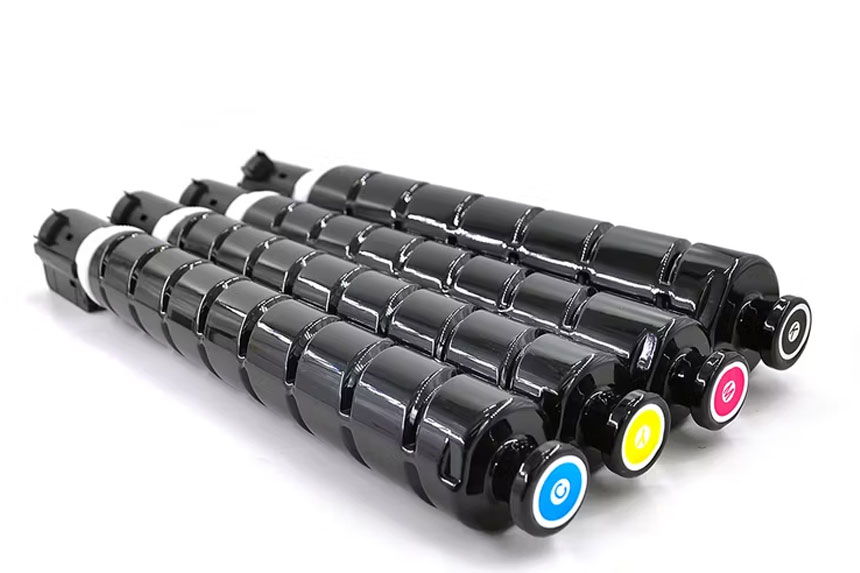
Canon Copier Toner: How to Choose the Right Cartridge for Peak Performance
Choosing the right Canon Copier toner keeps your machine running smoothly and your prints looking sharp. You need to match the correct cartridge to your copier model, understand the differences between genuine and compatible options, and follow proper handling practices. This guide covers everything you need to make smart toner decisions that balance cost with quality.
What Canon Copier Toner Options Are Available
Canon copiers use three main toner types: genuine OEM (original equipment manufacturer), compatible third-party, and remanufactured cartridges.
Genuine Canon toner comes directly from Canon and includes cartridge series like C-EXV, GPR, and NPG for different imageRUNNER models. These cartridges meet Canon’s exact specifications and protect your warranty. Compatible toner cartridges are new products made by third-party manufacturers to fit Canon copiers. They cost less but vary in quality depending on the supplier. Remanufactured toner involves cleaning and refilling used Canon cartridges with new toner powder and replacement parts.
The average cost to print a page on a laser printer ranges from 5 to 8 cents for black and white prints, while color prints typically cost more. Your choice affects both upfront expenses and long-term printing costs. Genuine cartridges typically offer consistent page yield (the number of pages you can print per cartridge), while compatible options may vary. As part of laser printer consumables, toner represents your largest recurring expense alongside paper.
How to Match Toner Cartridges to Your Canon Copier Model
Your Canon copier requires a specific toner cartridge number that you must verify before purchasing.
Check your copier’s user manual, the label inside the toner door, or Canon’s website to find the exact cartridge model. For example, the Canon imageRUNNER ADVANCE DX C5850i uses GPR-61 cartridges with a high-capacity yield of 71,000 pages for black and 60,000 pages for color. Popular imageRUNNER series models use various C-EXV or GPR cartridge numbers. Buying the wrong cartridge wastes money and won’t work with your machine.
You can find your copier’s model number on the front panel or inside the paper tray. Write down both the copier model and compatible cartridge numbers before shopping. Some Canon copiers accept both standard and high-yield versions of the same cartridge. High-yield options cost more upfront but deliver more pages, reducing your cost-per-page for heavy printing volumes. The imaging drum (a related component that transfers toner to paper) typically lasts longer than individual toner cartridges and requires separate replacement.
At copiershub.com.au, you can search by your specific Canon copier model to find the exact compatible cartridge numbers, making the matching process quick and error-free.
Genuine Canon Toner vs Compatible Alternatives
Genuine Canon toner delivers reliable quality but costs more than compatible options.
OEM toner offers several benefits. It protects internal copier parts like the drum and fuser from premature wear. Canon follows ISO 24711 Testing Guidelines to measure page yields consistently, so you know what to expect. You maintain full warranty coverage and avoid potential damage claims. Print quality stays consistent from the first page to the last.
Compatible toner saves money but comes with trade-offs. Quality varies widely between suppliers. Some compatible cartridges print fewer pages than advertised or leak toner powder inside your copier. They may void your warranty if they cause damage. However, reputable compatible brands can perform well for basic printing needs. Look for suppliers offering satisfaction guarantees and check customer reviews before buying.
Remanufactured cartridges fall somewhere between genuine and new compatible options. They reuse original Canon cartridge shells with new internal components and dry toner material. Environmental benefits include reduced waste, but quality depends on the remanufacturing process. Some businesses use remanufactured toner successfully for everyday documents while reserving genuine toner for important presentations. Unlike liquid ink used in inkjet printers, toner won’t dry out during storage.
When choosing between OEM and compatible toner, visit copiershub.com.au to compare options for your Canon model. We provide detailed specifications, page yields, and customer reviews to help you make informed decisions.
Understanding Toner Powder Composition and Quality
The physical makeup of toner powder directly affects your print results and machine health.
Canon and HP printers mainly use magnetic toner powder containing iron magnetite, while brands like Brother and Samsung use non-magnetic formulations. Iron oxide typically accounts for about 40 percent of toner powder content, helping create the magnetic charge necessary for proper toner adhesion to the drum. Most manufacturers use between 85% and 95% plastic in powder form as the main component, combined with pigments for color and control agents for proper electrical charging.
This complex formulation explains why cheap, poorly manufactured toner causes problems. Low-quality toner may use incorrect particle sizes, insufficient control agents, or substandard plastic resins. These issues lead to poor toner flow, inconsistent charging, excessive waste, and potential damage to your copier’s photosensitive drum. The fuser unit heats and bonds toner to paper, and improper toner formulations can leave residue that shortens fuser life.
Best Practices for Toner Storage and Handling
Proper toner handling extends cartridge lifespan and prevents printing problems.
Store unused toner cartridges in a cool, dry place away from direct sunlight. Keep them in their sealed packaging until installation. Temperature extremes and humidity damage toner powder and internal components. Don’t store cartridges near heat sources like radiators or in damp basements.
When installing a new cartridge, gently rock it back and forth five or six times to distribute the toner powder evenly. Follow your copier’s installation instructions exactly. Don’t touch the green drum surface or expose it to bright light. These sensitive parts damage easily and affect print quality. Remove the protective sealing tape completely before installation.
Handle toner cartridges carefully to avoid spills. If you spill toner powder, use a damp cloth to clean it up. Never use a regular vacuum cleaner, as toner particles are too fine and may damage the motor. Wash your hands after handling cartridges. Store partially used cartridges flat in a sealed plastic bag if you need to remove them temporarily. The cartridge housing protects internal components, so avoid dropping or mishandling it.
Common Toner Cartridge Problems You Can Prevent
Most toner issues stem from improper handling or using low-quality cartridges.
Faded prints usually mean your toner is running low or the cartridge wasn’t shaken before installation. Streaks or lines indicate a dirty drum or improperly seated cartridge. Remove the cartridge, check for protective tape you missed, and reinstall it firmly. Print quality settings affect toner consumption, with higher quality settings using more toner and reducing page yield.
Toner smudges happen when excess powder builds up inside the copier. Run your machine’s cleaning cycle regularly. Check your user manual for the specific process. Paper jams increase when using incompatible toner that leaves residue on internal rollers. This residue makes paper stick and misfeed.
Leaking cartridges create messy problems and potential machine damage. This happens more often with poorly manufactured compatible cartridges. If you notice toner powder inside your copier, stop using that cartridge immediately and clean the affected areas. Consider switching to a different supplier or genuine Canon toner to prevent repeat issues. Watch for signs of toner depletion like lighter prints or streaking, which indicate you need replacement soon rather than waiting for complete failure.
If you experience persistent toner problems, contact the support team at copiershub.com.au for troubleshooting guidance specific to your Canon copier model.
How to Calculate Your True Printing Costs
Understanding toner compatibility with your printing volume helps you make cost-effective decisions.
Calculate cost per page by dividing the cartridge price by its projected page yield. Add about one to two cents per page for paper costs. A $200 genuine Canon cartridge yielding 10,000 pages costs 2 cents per page, while a $100 compatible cartridge yielding 3,000 pages costs 3.3 cents per page. The genuine option actually saves money in this scenario.
Consider your monthly print job volume when choosing between standard and high-yield cartridges. High-yield cartridges cost more initially but deliver better value for heavy users. Document complexity matters too, as pages with dense text, images, or graphics use more toner than simple text documents.
Factor in maintenance costs and potential downtime. Low-quality toner may require more frequent copier servicing or cause failures that halt your workflow. A cheap cartridge that damages your copier’s drum creates expensive repair bills that eliminate any savings. Calculate total ownership cost over six months or a year rather than just comparing initial cartridge prices. The toner supply system in your copier (how it meters and delivers toner to the drum) works most efficiently with properly formulated toner powder.
Use the cost calculator tool at copiershub.com.au to compare genuine Canon toner against compatible alternatives for your specific printing volume and needs.
Maintaining Your Copier for Better Toner Performance
Regular copier maintenance improves toner efficiency and extends machine life.
Clean your copier’s interior monthly using a soft, lint-free cloth. Wipe away dust and toner residue from accessible areas. Don’t spray cleaning products directly on internal parts. Replace the drum unit according to your manufacturer’s schedule, typically after 20,000 to 50,000 pages depending on your model.
Run test prints after installing new toner to verify proper installation. Check for even coverage, correct colors, and sharp text. Print a few pages to allow the toner to distribute properly before starting important jobs. Update your copier’s firmware when Canon releases new versions, as these updates sometimes improve toner management.
Keep your print output quality high by using appropriate paper. Lower-quality paper creates more dust that interferes with toner adhesion. Store paper properly to prevent moisture absorption, which causes poor toner bonding and smudged prints. Clean the paper path rollers every few months to remove accumulated toner and paper dust. The transfer belt (which carries toner from drum to paper) requires occasional replacement and can affect print quality when worn.
Recycling and Environmental Considerations
Responsible cartridge recycling reduces waste and may save money.
Canon offers free recycling programs for genuine toner cartridges in many regions. Visit Canon’s website to find collection points or request prepaid shipping labels. Some office supply retailers also accept used cartridges regardless of brand. Never throw toner cartridges in regular trash, as they contain materials that shouldn’t enter landfills.
Recycling programs sometimes offer incentives. Canon’s recycling initiative provides credits toward future purchases in some areas. Third-party recycling services may pay small amounts for empty cartridges. Check local regulations about toner disposal, as some areas classify empty cartridges as electronic waste requiring special handling.
Remanufactured cartridges reduce environmental strain by reusing original cartridge components. If you choose this option, ensure your supplier follows proper remanufacturing standards and disposes of waste toner correctly. Buying high-yield cartridges also helps the environment by reducing packaging waste and transportation emissions compared to frequently purchasing standard-yield cartridges. Consider the full lifecycle of your printing supplies when evaluating environmental impact.
For Australian businesses, copiershub.com.au offers guidance on local recycling programs and eco-friendly toner options that meet both environmental standards and your printing needs.
Key Takeaways:
- Always verify your Canon copier model and match it with the correct cartridge number before purchasing to ensure toner compatibility.
- Genuine Canon toner provides reliable print quality and warranty protection, while compatible options offer cost savings with varying quality levels.
- Store toner in cool, dry conditions and handle cartridges gently to maximize their effective lifespan.
- Calculate true cost-per-page including page yield, not just initial cartridge price, to understand real printing expenses.
- Regular copier maintenance and proper toner handling prevent most common printing problems and extend machine life.
Need help selecting the right Canon copier toner? Visit copiershub.com.au to browse our complete range of genuine and compatible toner cartridges, access model-specific guidance, and get expert support for all your Canon copier needs.